Claude
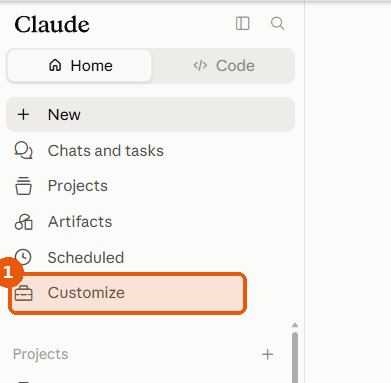
Whether you use claude.ai in the browser or the Claude Desktop app, you connect Findip the same way — click Customize in the left sidebar to open the settings dialog, then go to Connectors. Findip is a remote connector saved to your account, so signing in with the same account syncs it automatically between Claude on the web and the desktop app.
Using a Findip team seat? Start with Team setup and Connect with a team seat — accept your team invitation before you connect. The «Team and Enterprise plans» section below is about Anthropic's plans, which are not the same as a Findip team subscription.
Prerequisites
On the Free, Pro, and Max plans you can add a custom connector yourself from Customize → Connectors — just follow the setup steps below. Team and Enterprise plans work differently: an organization Owner has to register the connector first and members only connect to it, so see the Team and Enterprise plans section below. The Claude Desktop app (claude.ai/download) uses the same connector.
Setup steps (Free, Pro, and Max)
Open Customize
In Claude's left sidebar, click Customize. A settings dialog opens with two groups in the left list: Settings (General, Account, Privacy, Billing, …) and Customize (Skills, Connectors, Plugins).
Add a custom connector
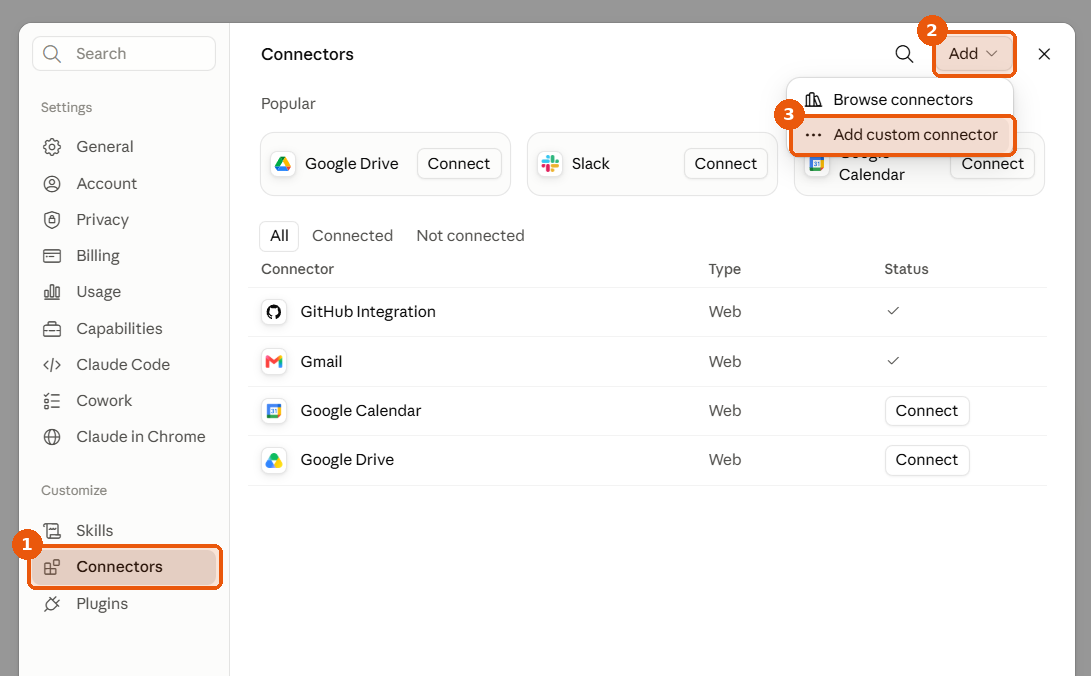
Under the Customize group, choose Connectors, then open the Add dropdown at the top right → Add custom connector. (Browse connectors in the same dropdown opens the public directory — you don't need it for Findip.)
The screen has a row of popular connectors at the top, All / Connected / Not connected tabs, and a Connector · Type · Status table. Once registered, Findip appears there as type Web with a Custom badge.
Register the MCP URL
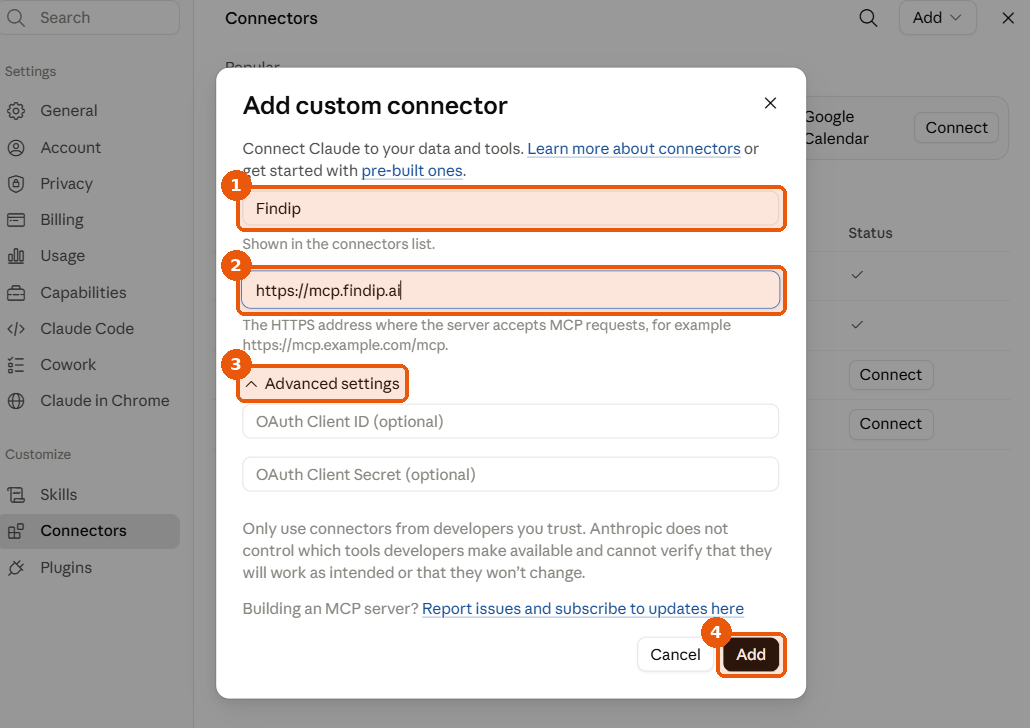
Name — anything you like (e.g. Findip). This is how it appears in the connectors list and in the chat connector menu, so pick something you'll recognize later.
URL — paste the address below as-is.
You don't need to open Advanced settings — Findip handles standard OAuth automatically, so leave the OAuth Client ID / Secret fields blank and just click Add. If you see a Request headers section, leave it empty too — Findip authenticates over OAuth.
Set tool permissions
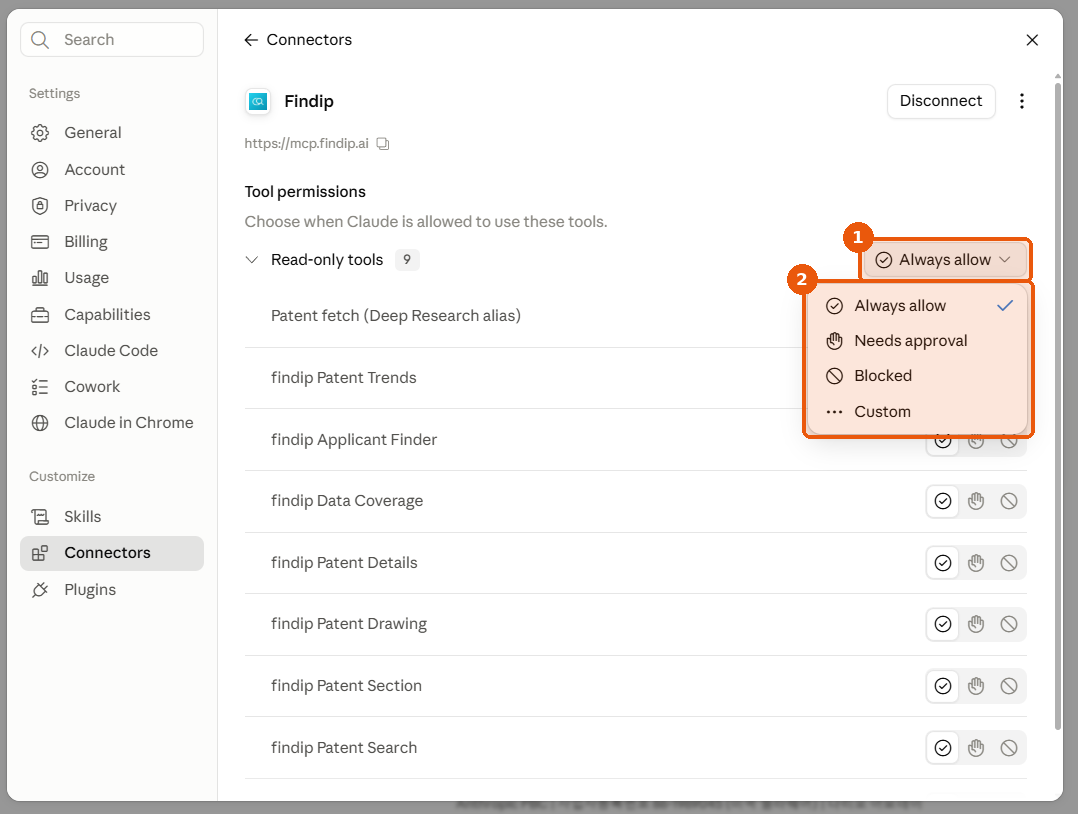
Click the Findip row in the connectors list to open its detail screen. The registered MCP server URL (https://mcp.findip.ai) is shown at the top, so you can confirm here that it registered correctly.
Set per-tool permissions under Tool permissions («Choose when Claude is allowed to use these tools.»). Every Findip tool sits in the Read-only tools group — they only read, so Claude never changes or deletes your data.
Each tool has three icons: allow, ask every time, and block. Set the ones you use often — findip Patent Search, findip Patent Trends, findip Applicant Finder — to allow and Claude searches right away instead of asking each time; set any you don't need to block and Claude won't call them. The dropdown to the right of the group name changes the whole group at once.
The list also shows two entries named Patent search (Deep Research alias) and Patent fetch (Deep Research alias).
Sign in (popup)
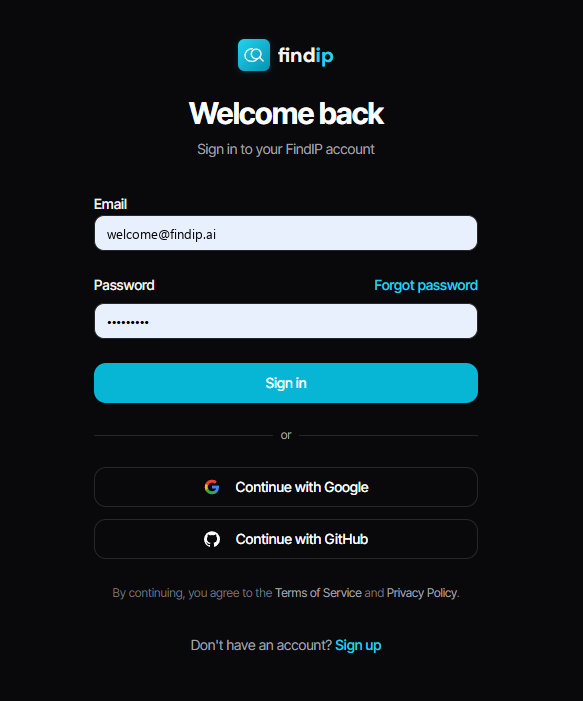
After you click Add, a browser popup opens the Findip sign-in screen. Sign in and approve access to finish the connection — tokens auto-refresh from then on, so you won't be asked again. Don't have a Findip account yet? Use Sign up at the bottom of the same screen.
If the popup doesn't appear, allow popups for claude.ai via the icon in the address bar and try again.
Turn it on in a chat
Click the + button in the composer → Connectors. Below Add connector and Manage connectors you'll see your connected connectors as toggles — switch on the one you named in step 3 (e.g. Findip). It's per conversation, so you can leave it off in chats where you don't need it.
Tool access isn't a permission setting
Tool access at the bottom of that same menu lets you pick between Load tools when needed and Tools already loaded — it controls when tools are loaded, not whether they're allowed. It's separate from Tool permissions (allow/block) in step 4.
Team and Enterprise plans
On Team and Enterprise plans members can't add a custom connector themselves. An organization Owner registers it once in the organization settings, and members just sign in.
Owner — register the connector
Go to Organization settings → Connectors → Add → Custom. If Claude asks for the connector type, choose Web, enter the remote MCP server URL, and click Add.
Leave the OAuth Client ID / Secret under Advanced settings blank.
Members — connect
Go to Customize → Connectors, open the Not connected tab, find Findip with the Custom badge, click Connect, and sign in with your Findip account. The Owner already registered it, so there's no URL to enter.
Sample prompt
Prompt
"Compare the key claims of 10 major US and Japanese patents filed since 2020 on noise-correction algorithms for autonomous-driving LiDAR sensors."
Troubleshooting
The Connectors menu isn't visible.
Click Customize in the left sidebar to open the settings dialog, then look under the Customize group for Connectors. The Free plan can add custom connectors on claude.ai too.
There's no Connectors entry under Settings.
Opening connectors from the Settings group just shows «Connectors have moved to Customize.», and so does the claude.ai/settings/connectors URL. Use Connectors under the Customize group instead.
Team/Enterprise: Findip isn't listed.
Your organization Owner hasn't registered it yet. Members can't add a custom connector themselves — ask the Owner to add it under Organization settings → Connectors.
The OAuth popup is blocked.
Click the popup-blocked icon next to the address bar → allow popups for the claude.ai domain and retry.
I want to edit or remove the connector.
Click the Findip row in the connectors list to open its detail screen. The Disconnect button at the top right drops the connection, and the ⋮ menu next to it handles editing and removal.
Desktop: tools aren't recognized.
Fully quit Claude Desktop (including the tray / menu-bar icon) and relaunch. On macOS use ⌘Q to close background processes too.