Conversation mode vs Deep Research
Once Findip is connected to ChatGPT you can research patents in two ways — regular chat (instant answers) and Deep Research (autonomous, in-depth research). Picking the one that fits the task gives you both speed and result quality.
Regular ChatGPT · conversation mode
In each new conversation you select Findip from the + menu and ask in natural language. Answers come back in seconds, and you can see a result then immediately drill in with "narrow it down" or "just show this patent's claims" — ideal for checking a specific patent, reviewing claims and drawings, and quick iterative exploration. In short, a "search box + conversation partner".
Deep Research mode
ChatGPT calls Findip's two dedicated tools — search (find candidates) → fetch (retrieve full text) — dozens of times, researching autonomously across multiple steps to produce a source-cited report. Best for landscape analysis, broad prior-art searches, and competitor portfolio mapping — work that needs deep coverage. In short, "handing the whole research job to an analyst".
| Aspect | Regular ChatGPT | Deep Research |
|---|---|---|
| Mode | Interactive · instant answers | Autonomous · multi-step report |
| Speed | Fast (seconds) | Slow (minutes to tens of minutes) |
| Call volume | A few per query | Automatic, high-volume, repeated |
| Best for | Quick checks · iterative exploration · specific patent lookup | Landscape · comprehensive prior-art research |
Search credit usage
One user question does not equal one credit. Each search call made by ChatGPT uses 1 search credit, while fetch calls use 0 credits. Deep Research can therefore use more credits than regular chat depending on its scope and number of search iterations.
Running Deep Research in ChatGPT
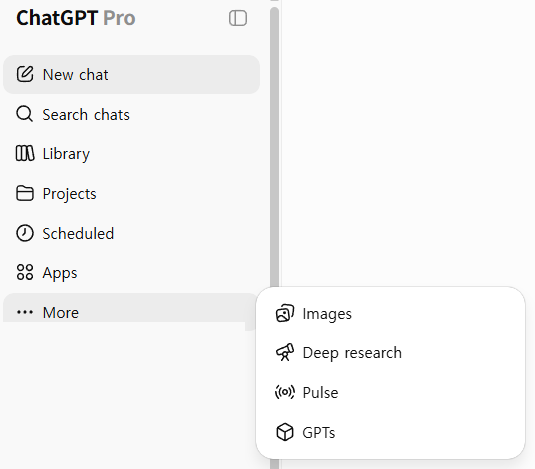
In the ChatGPT left sidebar, choose More → Deep research, then in the new conversation also select Findip via the composer + button so the deep research draws on Findip's patent data.
⚠️ Select Findip in Deep Research too
Even in Deep Research mode you must select Findip as a source from the composer + button for patent data to be included. Without it, the research runs on general web sources only.